I have in yahoo mail, a blank frame for this in my unread mail, trash mail and spam mail, but it won’t delete and is not deleteable and selectable. norton scans catch nothing. how do i get rid of it?
Hello @William_brandeis
The domain cow.huntforenenst.com is a suspicious address recently flagged for malicious activity, particularly targeting Yahoo Mail users. Security analysts and users have reported the following:
- Phishing & Credential Theft: Subdomains like
2.cow.huntforenenst.comappear to trigger when users access Yahoo Mail, potentially attempting to steal login credentials or personal content. - System Impact: Some users report that this activity “maxes out” system memory and persists even after running standard scans like Malwarebytes or Rkill.
Recommended Action Steps
Clear Browser Data: Remove all cookies and site data related to Yahoo and huntforenenst.com.
Check Extensions: Review your browser extensions for anything unfamiliar and remove them immediately.
Use Specialized Scanners: If standard antivirus fails, consider using a dedicated adware/hijacker remover such as AdwCleaner or follow a verified manual removal guide on the MalwareTips Forums.
Change Passwords: Immediately update your Yahoo Mail password and enable two-factor authentication (2FA) from a clean device.
========================================
This “blank frame” or ghost message in your Yahoo Mail is typically a cache-related display glitch or a script error, rather than a virus, which is why Norton scans show no issues.
To remove it, follow these steps in order:
Clear Your Browser Cache and Cookies
Corrupted temporary data often causes interface elements to get “stuck.”
- Go to your browser settings (Chrome, Firefox, or Edge) and clear your browsing history, cache, and cookies.
- Restart your browser and log back into Yahoo Mail.
Switch to the Yahoo Mail “Basic” or “Classic” View
This often forces the mailbox to resync and clears “ghost” items that the modern interface can’t handle.
- Click the Settings icon (gear) at the top right.
- Select More Settings.
- On the bottom-left of the screen, click Switch to basic Mail.
- Once in the basic view, check the folder (Unread, Trash, or Spam). If the blank frame is visible, try deleting it there.
- Afterward, you can switch back to the “Full-featured” or “Newest” version of Yahoo Mail.
Check for Conflicting Extensions
Ad blockers or security plugins can sometimes interfere with how Yahoo renders its mailbox list.
- Try opening Yahoo Mail in an Incognito/Private window.
- If the blank frame disappears, one of your browser extensions is likely the cause.
Use the Yahoo Mail Mobile App
If the web interface is stuck, the mobile app often provides a more direct sync with the server.
- Log into the Yahoo Mail app on your phone or tablet.
- Locate the blank message and try to delete or mark it as read there.
==================================
The blank frame you are seeing is likely a “placeholder” for a blocked malicious ad or script related to cow.huntforenenst.com. Norton is not “catching” it because it has likely already blacklisted the domain, so it is blocking the content from loading—leaving you with a persistent, non-deletable empty box in your Yahoo interface.
Because this is a browser-level issue (a “hijacker” or malicious script) rather than a traditional file-based virus, standard antivirus scans often miss the root cause.
Remove Malicious Browser Extensions
The most common cause for this “unselectable” frame is a hidden or renamed extension.
Open your browser settings (e.g., three dots in Chrome/Edge, or three lines in Firefox).
Go to Extensions > Manage Extensions.
Look for anything you didn’t specifically install. Even “innocent” looking ones like “Weather,” “PDF Converter,” or “Search Assistant” can be the culprit.
Remove any suspicious extension rather than just disabling it.
Clear Browser Cache and Cookies
Corrupted site data can keep the malicious frame “stuck” in your view even after the source is blocked.
- Go to Privacy and Security in your browser settings.
- Select Clear browsing data and set the time range to All time.
- Ensure Cookies and other site data and Cached images and files are checked before clicking Clear data.
Use a Specialized Adware Scanner
Since Norton is coming up empty, use a tool specifically designed for browser hijackers and “Potentially Unwanted Programs” (PUPs).
- AdwCleaner: This is a free, light tool that focuses specifically on browser-based threats like the one you’re experiencing. You can Download AdwCleaner from Malwarebytes.
- Malwarebytes (Free Version): Run a “Second Opinion” scan to find what Norton may be overlooking.
Step 4: Reset Browser Settings (Last Resort)
If the frame remains, your browser settings may have been modified at a deep level.
- In your browser’s Settings, search for Reset settings.
- Choose Restore settings to their original defaults. This will disable all extensions and clear temporary data without deleting your bookmarks or passwords.
===============================================
The presence of cow.huntforenenst.com in your Yahoo Mail suggests a browser hijacker or a Potentially Unwanted Program (PUP) has infected your browser. This is not a setting within Yahoo Mail itself but a malicious script or extension redirecting your traffic.
To remove it, follow these steps:
Remove Malicious Browser Extensions
Hijackers often hide as helpful tools like “Search Managers” or “Weather Alerts”.
- Chrome: Click the three dots (⋮) > Extensions > Manage Extensions. Remove anything you didn’t personally install.
- Firefox: Click the menu (≡) > Add-ons and themes > Extensions. Click the three dots next to suspicious ones and select Remove.
- Safari: Go to Settings > Extensions and uninstall unrecognized items.
Reset Your Browser Settings
If the redirect persists, a full reset will restore your homepage and search engine to their original defaults.
- Chrome: Go to Settings > Reset settings > Restore settings to their original defaults.
- Firefox: Type
about:supportin the address bar and click Refresh Firefox.
Run a Malware Scan
Use a specialized tool to find and delete hidden malicious files that manual cleaning might miss.
- Run a scan with a reputable tool like the Malwarebytes Free Version.
- For Windows users, also perform a Microsoft Defender Offline scan to catch threats before the OS fully loads.
Check Desktop Shortcuts (Windows)
Some hijackers modify the “Target” field of your browser’s desktop icon to force the redirect.
- Right-click your browser icon > Properties.
- In the Shortcut tab, check the Target field. It should end with
chrome.exe"orfirefox.exe". Delete any URL (likehuntforenenst.com) appearing after the quote.
===================================
Hello @William_brandeis
- Did you clear browser cookies n’ cache?
- Do you run browser sync?
- Did you recently install any program / browser extension?
- Did you recently allow push notifications?
- Did you recently change site permissions?
- Did you reset browser?
- Did you run Norton Full Scan?
- Did you run Malwarebytes Scan?
Resetting Google Chrome to clear unexpected issues
Reset Chrome settings to default
Web Browser Cleaning
Browser Push Notifications
============================
Please review: may be related here
=============================
Note: AI sourced content may make mistakes
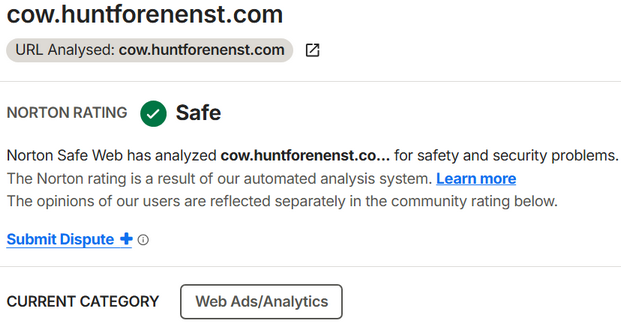
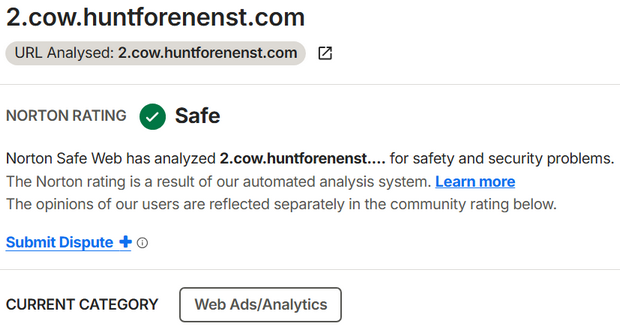
Web Ads/Analytics
Sites that provide online advertisements, banners, or the means to identify and market to existing or potential customers based on their browsing or online purchasing habits including but not limited to Web analytics sites such as visitor tracking and ranking sites. Includes social plugins and analytics that allow site visitors to share, vote for, or signal their appreciation of a site or its content (e.g. Facebook “Like” or Google “+1” plugins).
Examples: 2o7.net, ad.altervista.org, doubleclick.net, yieldmanager.net, track.adform.net, adserver.adtech.de, view.atdmt.com, oas.benchmark.fr, track.blogcounter.de, ad.thinkmedia.cn, google-analytics.com
Hello @William_brandeis