These updates were release for BOTH Window 10 and 11 simultaneously, please verify you have these installed on your respective system to be prepared and protected.
Hi SoulAsylum:
AFAIK most home consumers don’t need to apply this out-of-band (OOB) update as long as their computer can connect to the internet. As stated in that BleepingComputer article:
“The updates are for systems without Internet access, devices that cannot access Microsoft’s certificate-update service, and those where automatic Certificate Trust List (CTL) updates have been disabled.”
Windows Update never offered the KB5134125 OOB update (rel. Oct-26-2026) to my Win 10 v22H2 ESU laptop (currently OS Build 19045.7807) so I assume I’d have to download the .msu standalone installer from the Microsoft Update Catalog and install it manually if I needed it.
On a related note:
The 20-Oct-2026 Firefox v158.0.1 release notes for my default browser state:
“Mozilla blocked compromised eMudhra intermediate certificates via OneCRL on October 17th. The blocks were distributed to clients via Remote Settings the same day. This update contains the updated OneCRL block list, ensuring clients will block the compromised certificates even if RemoteSettings is disabled by policy or otherwise unavailable in the user’s network environment. (Learn More)”
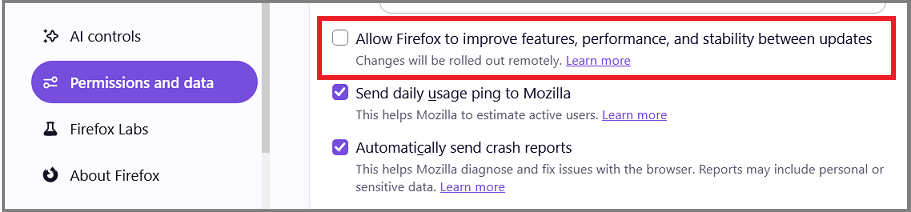
I currently have Remote Improvements (a.k.a., “progressive updating”) disabled in my Firefox browser at Settings | Permissions and Data | Firefox Data Collection and Use | Allow Firefox to Improve Features, Performance, and Stability Between Updates as shown below to prevent Mozilla from delivering fixes and feature changes to my Firefox browser between regular Firefox updates. However, I’m thinking about enabling this setting now that I know that Remote Improvements is the delivery mechanism that Mozilla used to roll out an updated OneCRL block list to block the compromised eMudhra intermediate certificates 3 full days before Firefox v158.0.1 was released.
Dell Inspiron 15 5584 * 64-bit Win 10 Pro v22H2 build 19045.7807 * Firefox v159.0.0 * Microsoft Defender v4.18.26100.4-1.1.26100.4 * Malwarebytes Premium v5.7.3.376-167.0.5780 * Macrium Reflect Free v8.0.7783
Indeed KB5134125 must be manually downloaded and installed on Windows 10 in unmanaged home environments. I have it installed on my machine already without issues. I can only suggest you do the same to be proactive. My personal view is NOT being reliant upon browser creature features to protect the core OS. They are notorious for not doing things as designed. FWIW! Norton should be doing this retrospectively for no other reason than, the AI being driven via Safe Web services. I’m not betting on that 100% either, just being on the safer side of the issue.
SA
Hi SoulAsylum:
Nor would I.
I only meant that most home users should not need to manually install a 26-Oct-2026 OOB update like the Win 10 KB5134125 that revokes trust for the compromised eMudhra intermediate certificates because Microsoft automatically pushes out updates to your local Certificate Trust List (i.e., the list of untrusted certificates) as long as your computer is able to connect to the internet and you have not deliberately disabled automatic Certificate Trust List (CTL) updates. If you aren’t sure that your local Certificate Trust List is receiving automatic updates in a timely manner then it does no harm to manually install the 26-Oct-2026 OOB update that matches your OS, but I doubt this is necessary for most home users.
The Remote Improvements (a.k.a., “progressive updating”) and Firefox v158.0.1 update I mentioned in my 02-Nov-2026 post <above> just adds an extra layer of protection against the compromised eMudhra intermediate certificates. Firefox has a feature called OneCRL that helps speed up revocation checking by maintaining its own centralized list of revoked certificates and pushing it out to browsers. The 03-Mar-2015 Mozilla Security Blog article Revoking Intermediate Certificates: Introducing OneCRL states:
“Firefox already has a mechanism for periodically checking for things that may harm users called blocklisting. OneCRL extends the blocklist to include certificates which should be revoked in addition to the errant add-ons, plugins and buggy graphics drivers currently included. This lets users get the benefit of fresh revocation information without having to update or restart their browser.”
The other major benefit of OneCRL is speed. For certificates covered by OneCRL, there is no need to do live OCSP checks, so revocation checking incurs no additional latency. The is especially important for EV certificates, where a positive OCSP response is required.”
Dell Inspiron 15 5584 * 64-bit Win 10 Pro v22H2 build 19045.7807 * Firefox v159.0.1 * Microsoft Defender v4.18.26100.4-1.1.26100.4 * Malwarebytes Premium v5.7.3.376-167.0.5780 * Macrium Reflect Free v8.0.7783
I’m with you on that.
SA