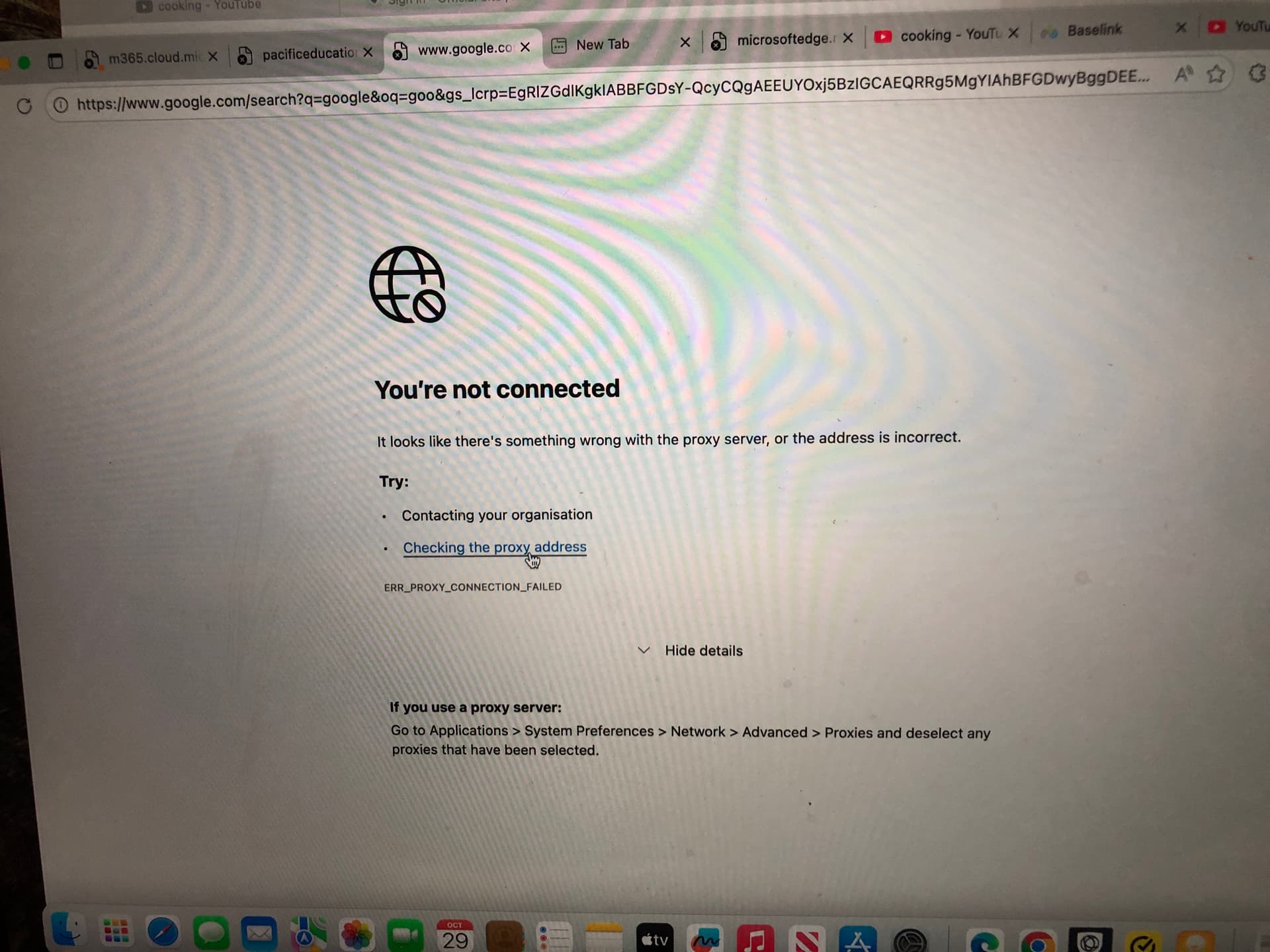
Using home WIFI, Safari works on my son’s laptop, but Microsoft Edge and Google Chrome doesn’t work and it says “looks like there’s something wrong with the proxy server or the address is incorrect. Error message is ERR_Proxy_connection_failed (all caps). (Checking the proxy address it says go to Applications- Networks- Advanced- proxies and deselect any proxies that have been selected). Picture below. I have played with the settings and it’s still not working.
It doesn’t work at school either. The IT department has said “As far as what I’ve seen on Joseph’s machine and our research has told us, the issue lies with Norton Antivirus’ VPN. It’s a shame because the school does indeed recommend students have antivirus protection of some description installed on BYOD devices. The issue we’re running into with this one is that Norton utilises a VPN on some level to do what it does. It looks to me like Norton can still operate and function without the features that require the VPN to be active and I would suggest we start with that.
I hope that makes sense. Basically, let’s not jump right ahead and say get rid of Norton - please suggest Norton be configured to not use any VPN features and see how we go.”
I checked and the VPN on Norton is not on but if anyone can give me instructions on how to “configure to not use any VPN features” that would be appreciated.
Issue abstract:
Detailed description:
Product & version number:
OS details:
What is the error message you are seeing? ERR_Proxy_connection_failed
If you have any supporting screenshots, please add them: See picture below
@Mary_Ticinovic I’m not a Mac owner or user but can try to help if you have not already found a solution. If you have please share it with the community.
Here is some AI generated information for your review. AI does make mistakes but reading this I believe it is as close as I would call spot on: Specifically the items I have made bold lettering for you.
AI Overview
Chrome
ERR_PROXY_CONNECTION_FAILED error on Chrome for Mac means your browser can’t connect through a proxy server, often due to incorrect settings, a faulty server, or interference from antivirus/VPNs; to fix it, check your Mac’s System Settings (Network > Proxies) to disable any manual proxy, clear Chrome’s cache/settings, try Incognito mode, or disable your antivirus’s SSL/TLS scanning, as guided by Apple Support, Reddit users and other experts.
-
Check Your Mac’s Proxy Settings (System Level)
-
Go to Apple Menu > System Settings/Preferences.
-
Click Network, select your active Wi-Fi/Ethernet, then click Details or Advanced.
-
Go to the Proxies tab.
-
Deselect any proxy protocols (like Web Proxy (HTTP), Secure Web Proxy (HTTPS)) that are checked.
-
Ensure “Auto Proxy Discovery” or “Automatically detect proxy settings” is selected if you’re on a network that needs it.
This video demonstrates how to access and change your proxy settings on a Mac:
[image]
01:17
[image]
[image]
Speedy Tutorials
YouTube • Sep 30, 2024
-
Clear Chrome’s Proxy & Browser Data
-
Type chrome://net-internals/#proxy in Chrome’s address bar and hit Enter.
-
Click the Clear host cache button.
-
Then, go to chrome://settings/clearBrowserData to clear your browsing data (cache, cookies).
-
Try Incognito Mode & Disable Extensions
- Open Chrome in Incognito mode (Cmd+Shift+N) to see if extensions are the cause.
- If it works, disable extensions one by one in
chrome://extensions.
- Check Antivirus/Security Software
- Temporarily disable your antivirus/firewall or its “HTTPS/SSL Scanning” feature, as this often blocks proxy connections.
- Reset Chrome Settings (If All Else Fails)
- Go to
chrome://settings/reset and select “Restore settings to their original defaults”.
- Restart Network & Computer
- A simple restart of your Mac and Wi-Fi router can resolve temporary network glitches.
Edge:
AI Overview
The
ERR_PROXY_CONNECTION_FAILED error on Edge for macOS often means your Mac’s proxy settings are misconfigured or blocked, but it can also stem from antivirus/firewall interference or network issues, requiring you to check/disable security software, adjust proxy settings in System Settings (Network > Details > Proxies), clear Edge cache, or even flush DNS/reset network settings via Terminal.
Quick Fixes
- Restart Edge: Fully quit and relaunch Microsoft Edge (Command + Q).
- Check Network/Proxy: Ensure no proxy is set unless needed. Go to
System Settings > Network > [Your Network] > Details > Proxies and turn off any active proxy settings.
- Disable Security Software: Temporarily turn off your antivirus or firewall to see if they’re blocking the connection.
Deeper Troubleshooting
- Check Edge Settings: In Edge, go to
Settings > System and click “Open your computer’s proxy settings” to access the macOS settings directly.
- Clear Edge Cache: Clear browser cache and cookies within Edge’s settings.
- Flush DNS & Reset Network (Terminal): Open Terminal and run these commands, pressing Enter after each, then restart your Mac.
bash
sudo dscacheutil -flushcache; sudo killall -HUP mDNSResponder
sudo ipconfig set en0 DHCP # Or en1 for Wi-Fi
sudo ipconfig set en0 DHCP # Rerunning for good measure
- Reinstall/Reset Edge: If issues persist, try cleaning out Edge’s library files in
~/Library/Application Support/Microsoft/Edge/ or reinstalling the browser.
- Test Network: Try a different Wi-Fi network or mobile hotspot to rule out ISP issues.
SA
What happens if you disable Norton VPN and try again?