Latest version was working fine for years. I upgraded Windows 11 to 25H2. System will reboot but eventually crashes with a SYSTEM_SERVICE_EXCEPTION 0x3b. I’ve done Windows 11 reinstall and updates. All drivers are current. System passes a complete diagnostic After a long process of elimination I determined removal of Norton 360 was only solution.
@louismccut How did you come to the conclusion that Norton is the cause? What was the version and build of Norton that was installed?
-What is your device hardware configuration? CPU, memory etc.
-Any recent changes to the BIOS such as memory shading / caching?
-How recent was the upgrade to version 25H2?
-What did the Windows events viewer report before you clean reinstalled? Please share as much as
you can with us.
-Where there other “stop codes” associated with SYSTEM_SERVICE_EXCEPTION 0x3b.
Regards,
SA
Process of elimination. I installed Norton 360 (latest download from mynorton - not installed so I don’t have the version handy). Reboot system get BSOD. I did many iterations of selective startup which narrowed it to Norton. Multiple times I installed Norton 360, it crashed. Uninstalled it didn’t crash.
This is a recent model Dell laptop. The Norton problem started with the upgrade of Windows 11 to 25H2. Uninstalling 25H2 is not a Windows Update option. I did a Windows reinstall to no avail. All Dell drivers, and Windows 11 are up to date. That is the only stop code. It was caused by driver ntoskrnl.exe address ntoskrnl.exe+4f6430.
My hope is that this pops up for someone else and gets resolved. Meanwhile I’ll (reluctantly) depend on Windows Defender. I’m not keen on the idea of wiping the system and installing 11 from scratch.
Bonjour,
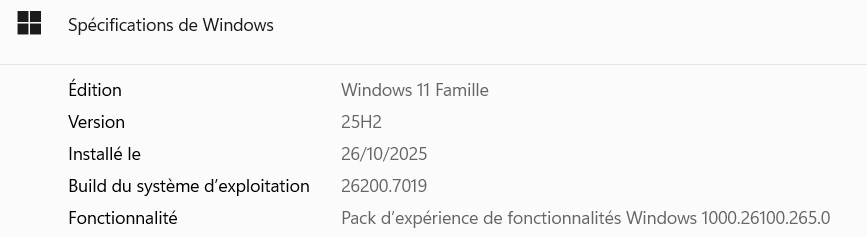
A titre d’information seulement, depuis début octobre 2025 je possède le PC portable gamer ASUS ROG STRIX G16 -G1614PM sur lequel sont installés Windows 11 Famille 25H2 (voir image ci-dessous) et Norton 360 version 25.10.10528 et je n’ai pas rencontré de BSOD.
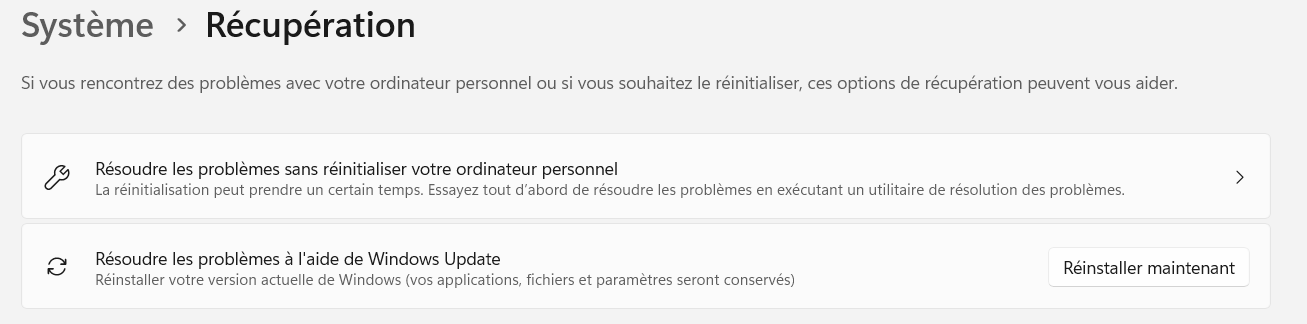
Si vous le souhaitez, vous pouvez tenter de réinstaller Windows facilement sans aucune perte de données garantie en suivant la procédure ci-dessous :
- Menu Démarrer
- Paramètres
- Système
- Récupération
- Résoudre les problèmes à l’aide de Windows update
- Cliquez sur “Réinstaller maintenant” (voir image ci-dessous)
- Suivez les instructions à l’écran
- Une fois la procédure terminée vous pouvez supprimer l’ancienne version de Windows en supprimant les fichiers temporaires
1 Like
Thanks for the OEM maker of your device. The reason I asked for the MODEL of your laptop is to determine what the hardware you have is and whether you are running an ARM CPU. Or, if by chance you are running Windows 11 in S mode. Can you get the model info for review?
Having destroyed the logs and crash dumps prior, the only real way to determine “what” is causing Windows to BSOD during the boot process isn’t possible now. Unless you reinstall Norton. Before rebooting and after Norton installs verify the version you are on and record that information. Then manually run live updates. Reboot. IF the system reboots and does another BSOD please don’t clean install Windows again, that will destroy crash dumps and other evidence we can review for you. Norton can be removed by booting Windows 11 into safe mode so I would give the suggestion a try vice a clean reinstall of W11.
25H2 is heavy, heavy on AI features, specifically Co-Pilot +. There were issues with it long before version 25H2, 25H2 was also just a “feature enablement update” to turn on features that were already there. Otherwise it didn’t bring anything new to the OS.
I had also asked whether there have been any recent BIOS updates. Those usually are delivered via Windows Updates as well. My Dell daily duster rig gets them in that manner, as well as my HP devices and gaming rigs that are custom builds. Stay the course we will get you some answers.
SA
Bonjour,
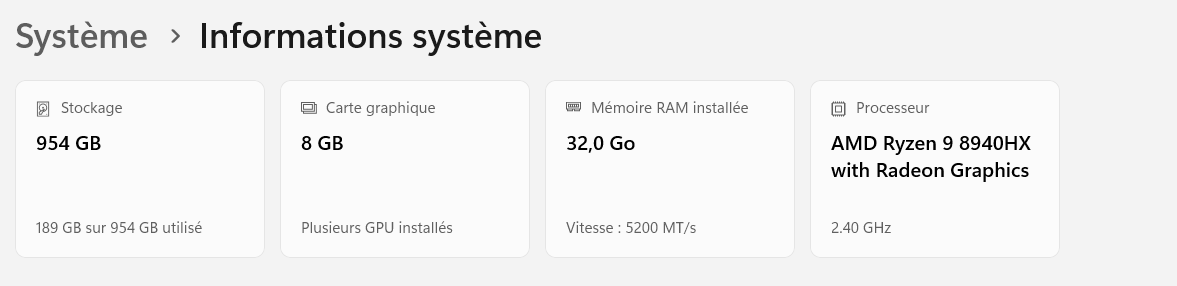
Afin de ne pas créer de confusion, je me permets de partager ici les principales caractéristiques de mon PC ASUS ROG STRIX G16 (image ci-dessous)
En ce qui me concerne, toutes les mises à jour qu’il s’agisse du BIOS, des pilotes ou des périphériques se font à partir de l’application préinstallée MyAsus.
Dell Latitude 5540 13th Gen Intel i7-1355U. I’ve got a single minidump from a crash I triggered. Drivers are up to date since when I have a system crash (I support over 300) the first thing I do is get updated on drivers and Windows to see if that resolves the problem.
The extended pre-boot diagnostics show no issue.
How large is the minidump file size that you have?
These are the two video hardware options that Dell shows. NVIDIA® GeForce®MX550 or Intel® Iris® Xe Graphics? If the former, are you using this driver?
And the latter, is using this driver?
SA
Iris. Intel version 32.0.101.7026, Given that this is an interaction with Norton 360 causing the crash while Norton is starting up, and not doing any video interaction, I doubt the video driver is the cause.
Given the nature of the client I’m comfortable if they stick with Defender. If I come across anyone else who has BSODs with 25H2 then I’ll pursue this issue at that time.
2 Likes
Do you have system recovery (symantec/veritas...) installed, because we had the case and the old versions are not compatible for some time, following a norton or windows update, the newer ones must be updated.
I was having this same issue and I can confirm that it was caused by some kind of interaction between Norton 360 and Symantec System Recovery. Either one one could be installed on it’s own but not the two together. I figured it was past time to get rid of system recovery and I switched to Macrium Reflect.