unglaublich aber war: seit dem Update von gestern habe ich Probleme mit der Programmsteuerung in der Firewall. Meine dortigen Einstellungen (Zulassen = 59 / Blockieren = 12 / Benutzerdefiniert = 0) werden nicht beibehalten und ändern sich automatisch ohne mein zutun.
@r-a-d-o Are you Windows 10 or 11? There are others posting this issue today as well. I’d have to take a look at my personal laptop which has Windows 11 Pro to validate whether I see this my side. Currently I am on my Windows 10 Pro daily use machine, I do not see the issue on this machine,
FWIW. I live updated my laptop Norton install a bit ago, rebooted, rechecked program controls before and after the update. Nothing changed at that time. I DID just notice on my daily duster ( this machine I am now using ) entries for Adobe Acrobat I had previously set to “ask” are now set to “allow”. Nothing performance nor connectivity has changed but the answer is. Yes, the Norton firewall is reevaluating programs on the fly, most likely when they are set to automatically check for updates in services. I will disable that setting it to manual and see what my results are.
Ich weiß nicht, ob deine Antwort von meinem Übersetzungsprogramm korrekt übersetzt hat, aber das Ganze ist mehr nicht zufriedenstellend. Die Firewall kann doch hier nicht Programm, welche ich auf „Blockieren“ gestellt habe, selbstständig auf „Zulassen“ bzw. auf „Benutzerdefiniert“ stellen . . . Sorry, aber da ist mein vertrauen in diese Software mal ganz schnell weg.
Your translation isn’t an issue, I read your post clearly. Yesterday evening I didn’t get a screenshot of program control as a starting point to see what is changing. I just changed three settings back to what I always keep them set at which I am positive have changed. That screen shot is below:
I will check throughout the morning and afternoon for these being changed on their own merit and zero intervention from me.
[1] Unless we are using the Wed App for Adobe services the only way to disable its auto updates is in Windows Services. I have done so here as shown below as a test:
Just now, I opened Acrobat as a test, when opening that program the prior setting for program control changed to “custom” by the Norton program control.
That is exactly what I tried to convey. Aka: That user program interaction is a part of the changes, and, that program control should honor the settings we give it. Hope that clears things up a bit.
The issue as far as I have knowledge has not been escalated, I will do so today tagging this thread. For each of you please create logs and generate a report.
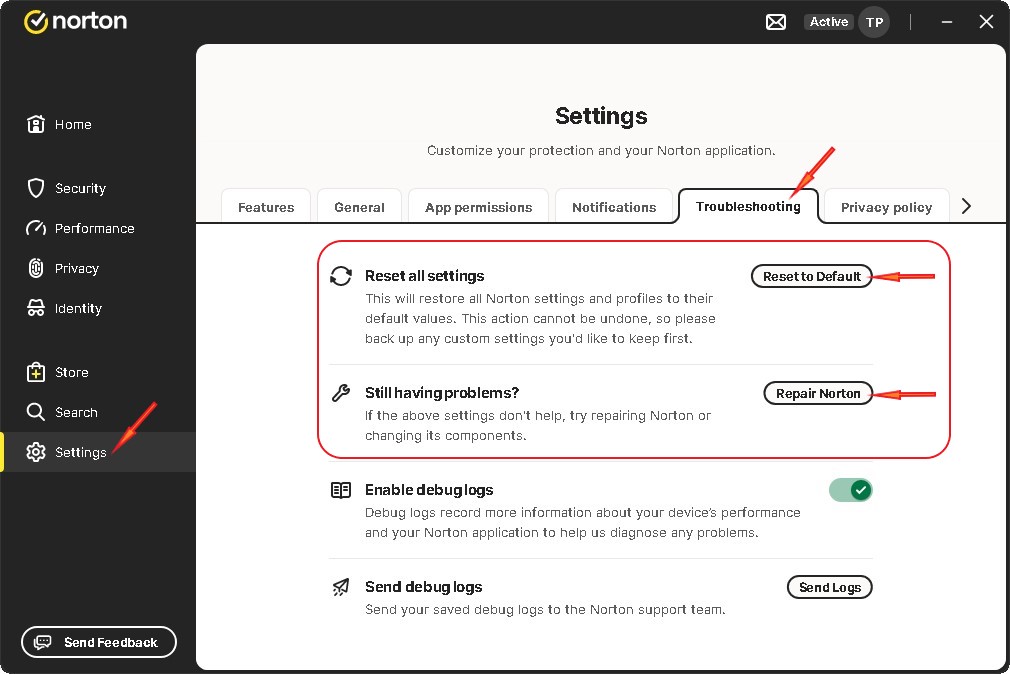
If nothing changes enable debug logs and click “Send Logs”. Creating the logs may take a few minutes. Also not the log prefix when they are created. Norton may ask for that in the event they contact you.
Everyone: In the opening post in the thread, this thread is being tracked in two separate threads where Norton reviews things. A myriad off issues are being tracked there as well. To date I haven’t seen anything that suggests Norton is not aware of the issues being tracked there, conversely, Norton doesn’t always chime into threads either. Unless one of our Admins gives us something we can share we are doing the waiting until something does appear. I do apologize that that is the way things are. There is nothing myself or the other Guru’s can do other than continue dinging Admins and moderators for a response. Hoping that does come soon.