Note: Please do not post Personally Identifiable Information like email address, personal phone number, physical home address, product key etc.
Issue abstract: Back in June 2026 I had posted that Norton 360 was using the GPU when Edge was active. After an update was pushed, the issue seemed to have been resolved. Three months later, Norton is once again utilizing the GPU. Deepfake scanning is disabled.
Detailed description: Norton Antivirus processes (model_host.exe) are utilizing GPU when Edge is active.
Product & version number: 26.9.11171 (build 26.9.11171.0)
OS details: Windows 11
What is the error message you are seeing?
If you have any supporting screenshots, please add them:
I found a workaround on Reddit that seems to eliminate the GPU usage by model_host.exe. I don’t fully understand why. I’m also not sure if there are risks associated with it that aren’t immediately apparent. But it seems to works for me. Norton 360 is functioning “normally”. Your mileage may vary.
Open Norton 360 > Settings > General > Temporarily disable Tamper Protection
In Task Manager > Details > right-click on nortonui.exe > Properties > Compatibility tab > check “Run this program in compatibility mode for:” Windows 8 > Apply > OK
Re-enable Tamper Protection
Restart
Note: Repeat this procedure every time Norton 360 updates.
Although this modifies compatibility for the nortonui.exe process, doing so results in model_host.exe no longer using the GPU when Edge is active.
Edited to add: Okay. I missed the last step, “Restart”. I just did that. And now the model_host.exe Norton Antivirus processes that use the GPU no longer show up in Task Manager at all. I’m not sure if that is a good or bad thing. So I’m reverting the change for now.
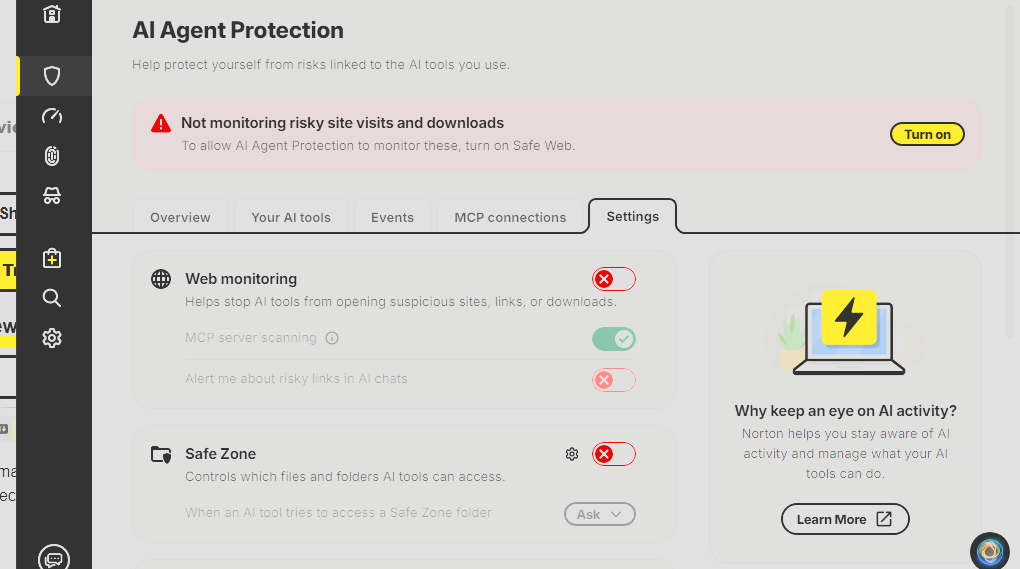
I may have found another solution. I just noticed that there is now an “AI Agent Protection” item in the Norton dashboard under Security. Disabling “Web monitoring” seems to stop the GPU utilization when Edge is active. With that AI feature disabled, Safe Web is still enabled and blocking visits to blacklisted websites.
Unfortunately disabling “Web Monitoring” in the AI Agent Protection settings does not eliminate GPU usage by model_host.exe. It seemed to after I disabled it yesterday. But today Norton is back to utilizing the GPU even with the feature disabled. Sorry for spreading misinformation.