Crash in nllnethub.sys

Note: Please do not post Personally Identifiable Information like email address, personal phone number, physical home address, product key etc.

Issue abstractcrash in nllnethub.sys

Detailed description:recently I had two crashes in nllnethub.sys

Product & version number:

OS details:windows 11 25H2

What is the error message you are seeing?crash in nllnethub.sys

If you have any supporting screenshots, please add them:

Hello @robert_scardapane
Product & version number:

========================================

Norton Security 25.11.10580 for Windows is now available!
https://community.norton.com/t/norton-security-25-11-10580-for-windows-is-now-available/469184

============================================

UI Version: 1.0.111 has been released to fix the issue of “Norton360 Makes Keyboard unusable - constantly grabs focus”. Please run Norton LiveUpdate and Restart the system to check if the fix is working.

=================================================================

AI Mode
The nllnethub.sys file is a system driver associated with networking or VPN (Virtual Private Network) applications, and crashes related to it are most often caused by faulty, outdated, or incompatible drivers, or potentially by security software conflicts.

Here are the recommended steps to troubleshoot and resolve the crashes:

Primary Causes & Solutions

  • Third-Party Security Software Conflicts: The nllnethub.sys driver is frequently linked to security programs like Norton Security.
    • Solution: Temporarily uninstall any third-party antivirus or VPN software (e.g., Norton) to check if the crashes stop. Windows Security will automatically provide basic protection in the meantime. If the system becomes stable, you may need to contact the software’s support or consider an alternative solution.
  • Outdated/Corrupt Network Drivers: Outdated or corrupt network drivers are a common cause of BSODs (Blue Screen of Death) involving system drivers.
    • Solution: Update your network drivers by visiting your computer manufacturer’s website or the network adapter manufacturer’s website (e.g., Intel, Killer Networking) to download and install the latest version for your specific model. You can do this via the Device Manager (right-click Start menu, select Device Manager, expand Network adapters, right-click your adapter, and choose Update driver).

General Troubleshooting Steps

If the above solutions do not work, proceed with these general steps to rule out other system issues:

  • Check for Windows Updates: Ensure your operating system is fully up to date, as Microsoft frequently releases bug fixes.
  • Run System File Checker (SFC) and DISM scans: These tools can automatically find and repair corrupted system files.
    1. Type CMD in the search bar, right-click Command Prompt, and select Run as administrator.
    2. Type the following command and press Enter: DISM.exe /Online /Cleanup-image /Restorehealth.
    3. Once that process finishes, type this command and press Enter: sfc /scannow.
    4. Restart your computer after the scans are complete.
  • Check System Memory (RAM) for Errors: Faulty RAM can cause various BSOD errors.
    • Solution: Type Windows Memory Diagnostic in the Start menu search bar, run the tool, and restart your PC to check for issues.
  • Analyze Minidump Files: For a more detailed analysis, you can locate and analyze the minidump files created during the crash. These files often pinpoint the exact driver or process that caused the crash. They are located in C:\Windows\Minidump.
  • Perform a System Restore: If the crashes started recently, you can use System Restore to revert your system to a previous working state before the issue began.

If the problem persists after these steps, it may indicate a deeper hardware problem, and you should consider contacting your computer’s manufacturer support or a local technician.

AI Mode may make mistakes

@robert_scardapane Have you had the opportunity to review the System Event Viewer for the logged content for the time these crashes occurred?

SA

That is exactly what I am running now. There was just an update. I am not sure what was updated. Yes I can generate AI help as well as the next person. Windows 11 is totally up to date: 26200.7171. Of course I have run sfc and dism and they are clean. File system is clean. etc, etc… I am not a novice user. Please pass this on to development becuase crashes are serious things. They could have a serious bug in their driver.

and yes I verified that this driver is part of Norton’s code. I don’t use a VPN. I looked at the evnt log and it’s quite boring up to time of crash.

Bugcheck code PAGE_FAULT_IN_NONPAGED_AREA

And it has nothing to do with RAM. That indicated an invalid memory reference in kernel code. Could be due to a variety of reasons such as an uninitialized pointer reference.

Hello @robert_scardapane

Contact Chat Support and Norton Phone Number (related notes here)

-----------------------------------------------------------

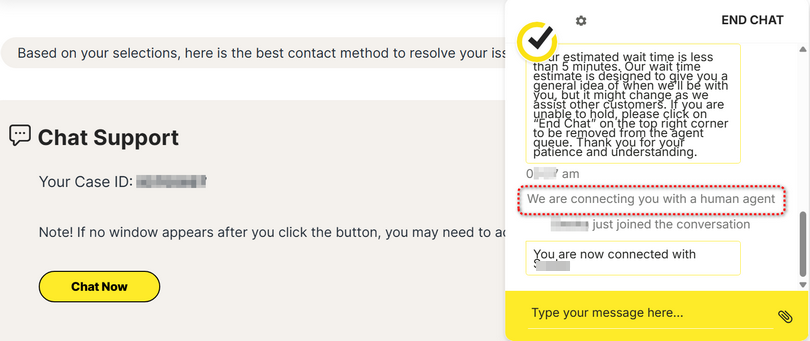
Please step thru Norton Support here to reach Norton Chat agent.

  1. Verify registered email address with one-time passcode sent to your email account.
  2. AI agent “How can I help you today?”
  3. Type your message
  4. AI agent offers preset solutions.
  5. AI agent “Do you need assistance with anything else?”
  6. Type your message
  7. AI agent “How may I be of assistance to you today?”
  8. Type your message
  9. AI agent “In a few words, could you let me know how I can help you today?”
  • type “agent” three times to reach a human agent

-----------------------------------------------------------------------------------

Explore other contact methods →

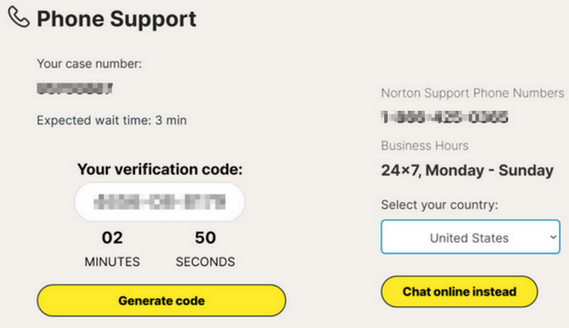
View phone number → Select your country:

  1. AI agent requests verification code:
  2. AI agent authenticates you.
  3. AI agent “How may I help you today?”.
  4. AI agent offers preset solutions.
  • speak “agent” three times to reach a human agent

-----------------------------------------------------

Contact Chat Support and Norton Phone Number (related notes here)

Care to share the “fault bucket code” from the system event or crash dump logs? Conversely, my suggestion is download the Norton support tool in the below Norton article. The download is in step #1. That is the fastest way to get the needed logs to Norton along with dump files for review. We will also tag this thread for escalation as well.

Send Norton product debug logs with Norton Support Tool?

SA

Here is the entire analyze -v:

Microsoft (R) Windows Debugger Version 10.0.22621.755 AMD64
Copyright (c) Microsoft Corporation. All rights reserved.

Loading Dump File [C:\temp\111225-16250-01.dmp]
Mini Kernel Dump File: Only registers and stack trace are available

Symbol search path is: srv*
Executable search path is:
Windows 10 Kernel Version 26100 MP (24 procs) Free x64
Product: WinNt, suite: TerminalServer SingleUserTS
Machine Name:
Kernel base = 0xfffff804acc00000 PsLoadedModuleList = 0xfffff804adaf5030
Debug session time: Wed Nov 12 11:20:08.785 2025 (UTC - 5:00)
System Uptime: 0 days 2:24:47.016
Loading Kernel Symbols
…
…
…
…
…
Loading User Symbols
Loading unloaded module list
…
For analysis of this file, run !analyze -v
14: kd> !analyze -v


  •                                                                         *
    
  •                    Bugcheck Analysis                                    *
    
  •                                                                         *
    

PAGE_FAULT_IN_NONPAGED_AREA (50)
Invalid system memory was referenced. This cannot be protected by try-except.
Typically the address is just plain bad or it is pointing at freed memory.
Arguments:
Arg1: ffffc58f346c0c70, memory referenced.
Arg2: 0000000000000002, value 0 = read operation, 1 = write operation.
Arg3: fffff804427358b6, If non-zero, the instruction address which referenced the bad memory
address.
Arg4: 0000000000000002, (reserved)

Debugging Details:

*** WARNING: Unable to verify timestamp for nllNetHub.sys

KEY_VALUES_STRING: 1

Key  : AV.Type
Value: Write

Key  : Analysis.CPU.mSec
Value: 1358

Key  : Analysis.DebugAnalysisManager
Value: Create

Key  : Analysis.Elapsed.mSec
Value: 1757

Key  : Analysis.Init.CPU.mSec
Value: 14327

Key  : Analysis.Init.Elapsed.mSec
Value: 14654

Key  : Analysis.Memory.CommitPeak.Mb
Value: 146

FILE_IN_CAB: 111225-16250-01.dmp

TAG_NOT_DEFINED_202b: *** Unknown TAG in analysis list 202b

DUMP_FILE_ATTRIBUTES: 0x21808
Kernel Generated Triage Dump

BUGCHECK_CODE: 50

BUGCHECK_P1: ffffc58f346c0c70

BUGCHECK_P2: 2

BUGCHECK_P3: fffff804427358b6

BUGCHECK_P4: 2

READ_ADDRESS: fffff804adbc44c0: Unable to get MiVisibleState
Unable to get NonPagedPoolStart
Unable to get NonPagedPoolEnd
Unable to get PagedPoolStart
Unable to get PagedPoolEnd
unable to get nt!MmSpecialPagesInUse
ffffc58f346c0c70

MM_INTERNAL_CODE: 2

IMAGE_NAME: nllNetHub.sys

MODULE_NAME: nllNetHub

FAULTING_MODULE: fffff80442710000 nllNetHub

BLACKBOXBSD: 1 (!blackboxbsd)

BLACKBOXNTFS: 1 (!blackboxntfs)

BLACKBOXPNP: 1 (!blackboxpnp)

BLACKBOXWINLOGON: 1

CUSTOMER_CRASH_COUNT: 1

PROCESS_NAME: Creative Cloud

TRAP_FRAME: ffffbf80e6ae5b60 – (.trap 0xffffbf80e6ae5b60)
NOTE: The trap frame does not contain all registers.
Some register values may be zeroed or incorrect.
rax=0000000000000000 rbx=0000000000000000 rcx=b08dd9e724720000
rdx=fffff804ada16f00 rsi=0000000000000000 rdi=0000000000000000
rip=fffff804427358b6 rsp=ffffbf80e6ae5cf0 rbp=ffffbf80e6ae5d79
r8=0000000000000000 r9=0000000000000000 r10=ffffc58ef5d54b40
r11=ffffc58ef5d75d60 r12=0000000000000000 r13=0000000000000000
r14=0000000000000000 r15=0000000000000000
iopl=0 nv up ei ng nz na pe nc
nllNetHub+0x258b6:
fffff804427358b6 895f40 mov dword ptr [rdi+40h],ebx ds:0000000000000040=???
Resetting default scope

STACK_TEXT:
ffffbf80e6ae58f8 fffff804acfd1a0c : 0000000000000050 ffffc58f346c0c70 0000000000000002 ffffbf80e6ae5b60 : nt!KeBugCheckEx
ffffbf80e6ae5900 fffff804ace40510 : ffff0f0d3f497c22 ffff800000000000 ffffc58f346c0c70 0000007ffffffff8 : nt!MiSystemFault+0x7a0
ffffbf80e6ae59f0 fffff804ad2addcb : 0000000000000000 0000000000000000 ffffc58f346c0c30 0000000000000000 : nt!MmAccessFault+0x630
ffffbf80e6ae5b60 fffff804427358b6 : fffff80442797af0 ffffbf8000000000 00000000000007d0 00000000000007d0 : nt!KiPageFault+0x38b
ffffbf80e6ae5cf0 fffff80442797af0 : ffffbf8000000000 00000000000007d0 00000000000007d0 0000000000000001 : nllNetHub+0x258b6
ffffbf80e6ae5cf8 ffffbf8000000000 : 00000000000007d0 00000000000007d0 0000000000000001 0000000000000002 : nllNetHub+0x87af0
ffffbf80e6ae5d00 00000000000007d0 : 00000000000007d0 0000000000000001 0000000000000002 0000000000000000 : 0xffffbf8000000000 ffffbf80e6ae5d08 00000000000007d0 : 0000000000000001 0000000000000002 0000000000000000 00001f8000000000 : 0x7d0 ffffbf80e6ae5d10 0000000000000001 : 0000000000000002 0000000000000000 00001f8000000000 ffffbf80e6ae5e10 : 0x7d0 ffffbf80e6ae5d18 0000000000000002 : 0000000000000000 00001f8000000000 ffffbf80e6ae5e10 fffff80440634a3e : 0x1 ffffbf80e6ae5d20 0000000000000000 : 00001f8000000000 ffffbf80e6ae5e10 fffff80440634a3e 00000000`00000800 : 0x2

SYMBOL_NAME: nllNetHub+258b6

STACK_COMMAND: .cxr; .ecxr ; kb

BUCKET_ID_FUNC_OFFSET: 258b6

FAILURE_BUCKET_ID: AV_W_(null)_nllNetHub!unknown_function

OSPLATFORM_TYPE: x64

OSNAME: Windows 10

FAILURE_ID_HASH: {2531021e-291c-3868-235d-9302c12f0cce}

Followup: MachineOwner

already on and sent

1 Like

I can confirm this is an issue as I also have Norton installed and the same crashes.

121125-18421-01.dmp 11/12/2025 07:59:13 SYSTEM_SERVICE_EXCEPTION 0x0000003b 00000000c0000005 fffff8052f03873d ffffe781e28a1d80 0000000000000000 nllNetHub.sys nllNetHub.sys+873d x64 ntoskrnl.exe+4f6880 C:\WINDOWS\Minidump\121125-18421-01.dmp 8 15 26100 1,676,952 11/12/2025 08:00:04

120925-17812-01.dmp 09/12/2025 06:01:45 SYSTEM_SERVICE_EXCEPTION 0x0000003b 00000000c0000005 fffff8025415873d fffff982e70eac90 0000000000000000 nllNetHub.sys nllNetHub.sys+873d x64 ntoskrnl.exe+4f6880 C:\WINDOWS\Minidump\120925-17812-01.dmp 8 15 26100 1,973,054 09/12/2025 06:02:45

Likely part of “NortonLifeLock Network Hub”.

Yes it still crops up from time to time. I had a couple of crashes in this driver after the last update. I did a repair just in case. I have not seen it since the repair. But its intermittent enough that the repair may not have fixed anything.

Are you guys on the latest release 25.12.10659 (build 25.12.10659.0) and this is still happening?

SA

The latest crash happened on 25.12.10659.

I am sending more logs for what it is worth.

Not haopy with this product right now. An AV product should not crash a system.

Uploaded logs to file ID IRE5Y

All: This bucket ID is related 100% to virtual networking drivers, aka VPN. Have any of those affected looked for and installed network adapter drivers / video drivers from the OEM website of their perspective device makers? IE: Dell, HP, etc. And then retested? Anyone having the notion drivers for hardware or software other than Norton NOT being a possible cause should be doing their research. It can be.

Does total removal of Norton with the remover tool, and a reboot correct the issue? Please advise.

SA