Hello,
for a few days, the Scam Protection Pro function has been integrated into my Norton 360 advanced french subscription.
On my Android phone, I often have to reactivate this function several times a day by redefining Norton 360 as the default application for displaying the caller number and spam.
Is the issue shared, known, or related to my device (specific model or app in conflict?)
Cheers
Guillaume
2 Likes
Hi,
Is no one else experiencing the same problem or have they found a solution regarding the configuration?
Cheers
Guillaume
I don’t even see the call protection feature listed in the Canadian version of 360 Android. I have not seen any notation of Scam Protection Pro either.
Any US users see this yet?
3 Likes
I’m a US user and am having the same problem with Safe Calling.
1 Like
Bonjour @Guillaume1024
Je rencontre le même problème que toi avec mon abonnement Norton Advanced. Je suis contrainte de réactiver la fonction Scam Protection Pro plusieurs fois par jour sur mon Galaxy S25.
J’espère que ce problème est connu des équipes Norton et qu’il sera prochainement résolu. Le cas échéant, la fonction est inutile.
1 Like
Where are you reactivating the feature? If in Android Accessibility Service, it could be related to Android restricting the use of the Accessibility services to items actually related to Accessibility issues.
Check for any battery optimizations for Norton 360 in Android Settings. If found, turn off the optimization and test.
1 Like
Bonjour @peterweb
Merci pour votre aide.
Je réactive la fonction directement dans Norton 360. Je viens de vérifier les optimisations de la batterie sont bien désactivées sur mon smartphone.
Sorry I have no further ideas. As noted above, I still have not seen that feature for my Canadian Subscription.
@peterweb Ne soyez pas désolé, ce n’est pas très grave. Je suis surprise que cette fonctionnalité ne soit pas encore disponible au Canada. Habituellement, les utilisateurs français sont servis après les habitants de l’Amérique du Nord.
Hi,
This issue is still relevant on my end. And I might have a lead on the reason for this bug causing instability in the configuration of the new “Call Protection” function.
One surprising detail:
When Norton 360’s “Call Protection” feature isn’t configured and I try to access Android’s default app settings, specifically the “Default caller ID and spam apps” section, Norton 360 isn’t listed.
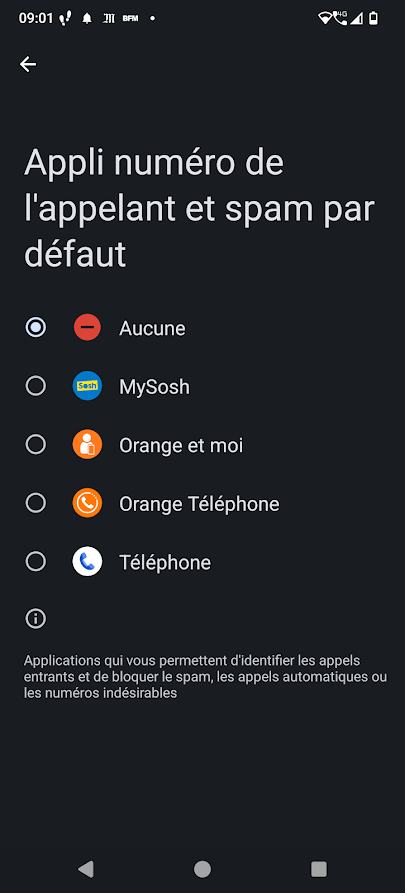
If I enable it through the Norton 360 app, it then appears in the Android default anti-spam app settings.
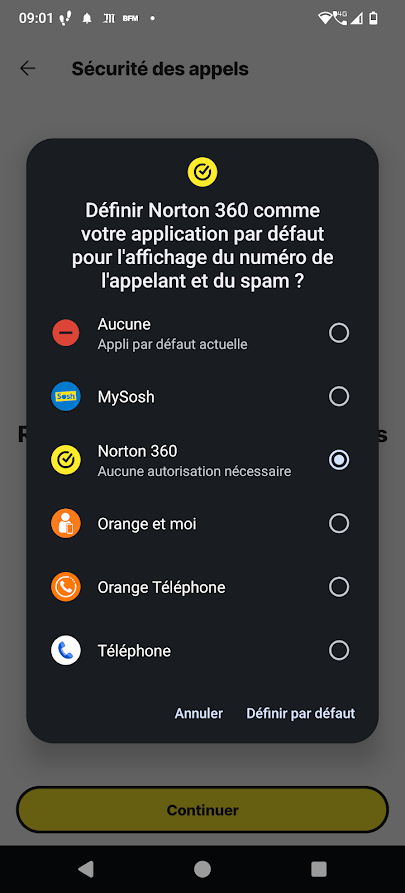
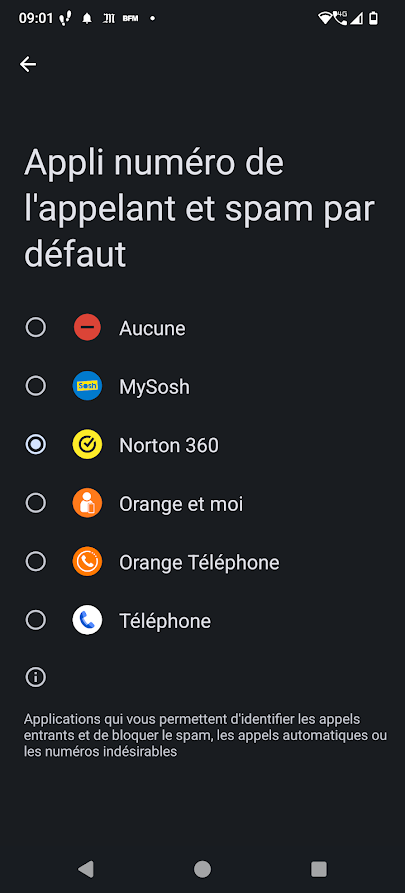
If I disable it in the Norton app, it disappears again. (See screenshot #1)
Surprising, isn’t it?
Cheers
Guillaume
Bonjour,
A la lecture de ton commentaire, j’ai fait un essai et je fais le même constat.
1 Like
Merci @Gribouille342 pour ta confirmation !
J’espère que ce soucis pourra être réglé prochainement.
Bonne journée à toi.
@Gayathri_R ; @Selvakumar.S ; @ivan.GenDigital : Do you have more information or need more details to pass on to the relevant teams?
Hi folks,
Thanks for tagging me here.
May I ask all of you affected by this issue to send N360 app logs and reference the following in the Description field (in the emails, when sending the logs):
- Your forum username from Norton forums
- Reference the Norton forums thread 472689
Once you send the logs, feel free to let me know via direct message.
I will check after that and let you know if we need more information.
Thank you.
Ivan
2 Likes
1 Like
Bonjour,
Malgré toutes mes recherches, je ne parviens pas à collecter les journaux depuis mon Galaxy S25 Je précise que l’option de collecte de journaux est bien activée.
1 Like
Bonjour @Gribouille342 ,
Il faut que tu ailles pour cela sur ton appli Android Norton 360, dans “Compte” => puis “Paramètres”
Dans l’écran Paramètres, tu cliques sur les 3 petits points en haut à droite.
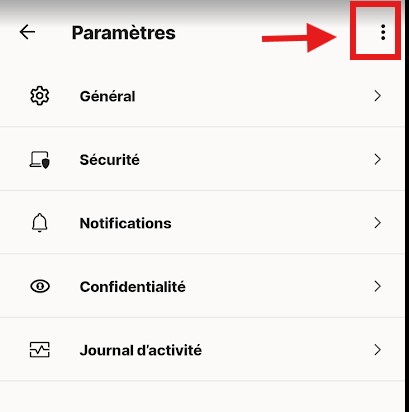
Tu dois alors voir apparaitre le menu “Journaux de l’appareil”.
Si tu cliques ensuite sur “Envoyer le rapport d’erreur avec les fichiers journaux”.
Ensuite, tu saisies les données d’ ID et de référence à cette conversation du forum demandé par Ivan et tu envoies.
Je pense que cela devrait fonctionner pour toi aussi.
Bonne journée à toi.
Guillaume
1 Like
@Guillaume1024 Merci pour la procédure. C’est bien ce que j’ai fait. L’option “activer le journal de débogage” est activée et lorsque je clique sur “envoyer le rapport d’erreur avec les fichiers journaux” je n’ai pas ID de dossier support et je ne peux pas finaliser la procédure.
There is no Support Folder ID to enter. This may again be a translation issue.
The two lines shown should be Support Case ID, and Briefly Describe your issue.
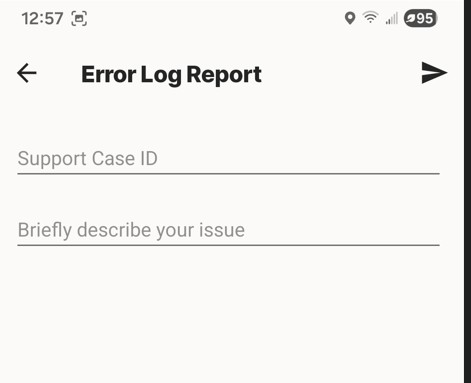
From Ivan’s post above, enter “Gribouille342” in Support Case ID. Then in the description of your issue, include “Forum thread 472689”
1 Like
Je vous remercie pour vos éclaircissements @peterweb
Je vais essayer de nouveau 