I know Model_host.exe has been something for a while now but I used to be able to disable it by stopping deepfake scanning. But recently I just noticed it has been running again and there are two processes hogging 1gb of vram. I checked scam protection and still noticed deepfake scanning is disabled. Where else can these .exe be running from?
Product & version number:
Norton 360 deluxe. I just tried to reinstall to fix the issue so probably a newer version
@TalonFang That service is a part of the AI training / Detections for Safe Web. Does disabling the Safe Web browser extension help ( if you are using it )?
AI Overview
The model_host.exe (and related modern_host.exe) process running under Norton 360 is a newly introduced background component tied to Norton’s local AI and machine learning features. [1, 2]
What is model_host.exe?
AI/ML Subsystem: It acts as a host environment for running local artificial intelligence or deep-learning models used by security features (similar to implementations in other security suites like Avast). [1, 2]
Resource Impact: Many users on the Norton Community Forum and AskWoody have reported that this process triggers high GPU, VRAM, and CPU utilization, or continuous background activity, leading to battery drain on AI-capable laptops. [1, 2]
How to Address High Resource Usage
Check AI Settings: Open your Norton 360 dashboard, go into settings, and locate any newly added AI-driven features, local threat-scanning enhancements, or deepfake/crypto-adjacent guards. Turn these features off to see if model_host.exe stops consuming resources.
Update Norton: Ensure your software is updated to the latest version via Help > About or checking for updates, as Norton frequently pushes hotfixes for post-update background looping. [1]
Run LiveUpdate: Manually run Norton LiveUpdate repeatedly until no more updates are found, then restart your system.
Perform a Clean Reinstall: If the process continues to malfunction or hog VRAM/GPU, use the official Norton Remove and Reinstall Tool to clear out corrupted background modules from recent updates.
I thought the same thing too but disabling safe web still has model_host running even after a restart. I even tried to disable almost all protection I could find and it still was running. Not sure what to do, just a waste of resources.
Another update. So I found out that edge was running in the background even though I had killed it in startup apps. I had to go into the setting of edge to stop it from starting and running the background and that did save from vram, down to ~400mb between the two processes. So it might be safe web even though I do not see a difference after disabling the feature entirely. What is confusing me is that I should only have Chrome and Edge on my system and with both close the processes are still running. My theory is safe web is scanning all the other things that uses a browser Microsoft has been stuffing windows 11 with. Or Norton mess up the setting and safe web or deepfake is not really disabled even though it should be in the settings.
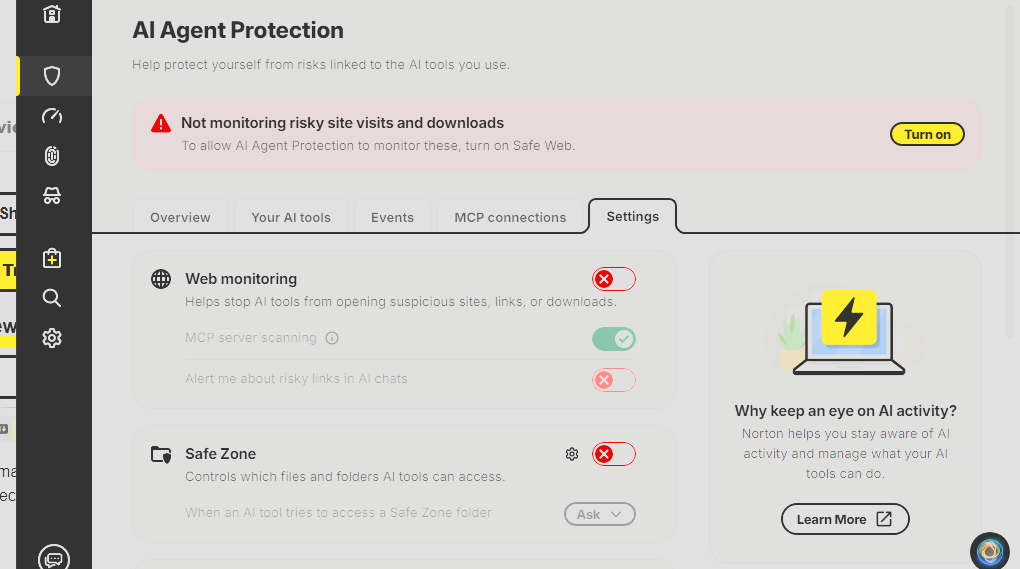
I may have found another solution. I just noticed that there is now an “AI Agent Protection” item in the Norton dashboard under Security. Disabling “Web monitoring” seems to stop the GPU utilization when Edge is active. With that AI feature disabled, Safe Web is still enabled and blocking visits to blacklisted websites.
Unfortunately disabling “Web Monitoring” in the AI Agent Protection settings does not eliminate GPU usage by model_host.exe. It seemed to after I disabled it yesterday. But today Norton is back to utilizing the GPU even with the feature disabled. Sorry for spreading misinformation.