We are happy to announce the release of Norton Security 25.9.10453 for Windows!
Norton Security helps protect your Windows computer with multiple layers of protection against viruses, ransomware, spyware, phishing, trojan horses, scam and other online threats as you bank, shop, and post online, and your private and financial information when you go online.
As with our previous updates, this version is being released in a phased manner. This update is available in all supported languages. To download it, simply run LiveUpdate through Norton user interface.
To verify you have the update for Norton Security, launch the Main User Interface, go to Settings and click on About.
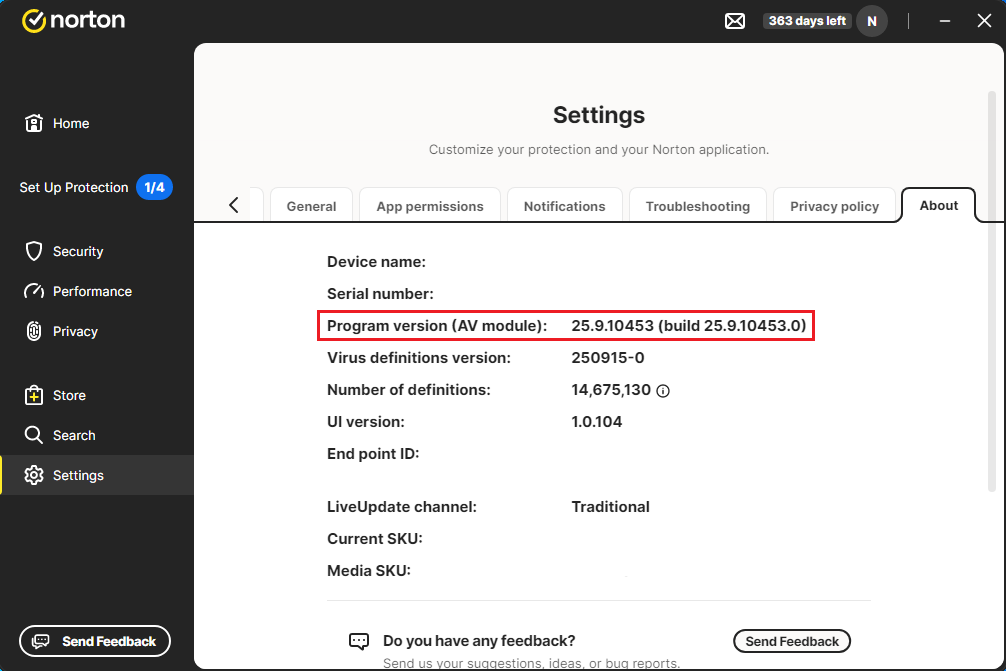
The FAQ section below addresses some common questions:
1. What is the version number for this patch?
Norton Security 25.9.10453
2. When will I receive the patch?
As is our standard practice, we are deploying the patch in a phased manner. We have released the patch to randomly selected customers, and will then monitor our telemetry, as well as this forum, for any problems or issues. Once we have confirmed the effectiveness of the patch, we will make it available to all customers. We will post an update on the Norton Community when we make the patch available to all customers.
3. How can I manually install these patches?
This patch is ONLY available via LiveUpdate, and is being released in a phased manner. You may need to run LiveUpdate and reboot a few times before your product is completely updated to the latest version.
4. What’s new in Norton Security 25.9.10453?
-
Bug fixes for the below issue:
- Added Delete icon to delete backup sets to fix ‘unable to delete backup sets’ issue - [Thread1], [Thread2], [Thread3], [Thread4], [Thread5], [Thread6]
- Unable to Cast screen to TV with Norton Firewall Enabled - [Thread1]
- “Network compromised” Norton message is fixed - [Thread1], [Thread2]
- Default Browser not detected on the N360 Windows Client
- Repeated Smart Scan advanced issues alert of the same kind have been reported and not resolved by the product
- Registry cleaning does not clean reported findings
- Facebook wall videos are not scanned via Deep Fake shield
- “Run smart scan” button is not working in the Onboarding experience
- Cloud / local Backup set deletion does not clean up registry entry
- Restore in inactive network Backup set fails after remapping the network drive
-
Other minor bug fixes and under-the-hood changes
5. Where can I post my queries?
Please visit Norton 360 for Windows board to post your queries.