FWIW. Blue Spinning Timer Disc.
Observing the rotating ‘blue’ timing disc spinning.
Should it be rotating on a transparent or a solid background ?
Best run in transparent mode.

Bonsoir,
Merci pour toutes vos précisions 
Hi @bjm. Thanks so much for all that you wrote. When all is said and done, V24 passed your test regarding blocking malware, so I suppose despite so many bugs, it ultimately does its main function.
I personally (just as a former user) do NOT like Avast (Free). Like so many other people here, I have a decision to make. Most likely try McAfee despite my being so used to Norton Seasoning.
P.S. I just read through the links you were kind enough to send me BJM. I can’t believe this one.
1 Like
I just wanna know what all these processes are and if I can disable them; before ver24 I had only 50-60 processes in the background with Norton ever having 2-3 processes for itself according to Task Manager. Now I’m getting 70-80+ with all this. I’ve had stuff like powershell.exe running for weird reasons or something called su_worker.exe tied to Norton, I got 2 Nortons in my taskbar despite only having ver24 installed and uninstalled ver22, and I got this message in my Firefox browser now and the solution that guru bjm on here suggested to me didn’t fix and remove it. Why did Norton do these things without my permission?
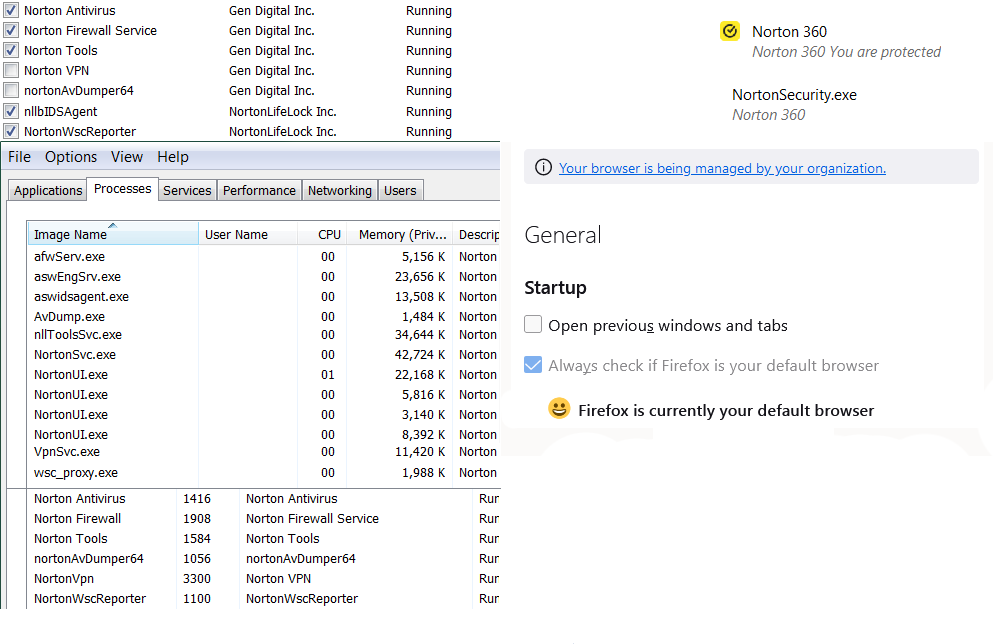
I have everything under the “cloud” section turned off now and excluded my computer from back-ups, but it doesn’t help. So I turn on the computer and walk away - maybe after ten minutes I can use it. For the next hour or two it usually works if I turn it on again, but after that it’s another long wait. But I guess if Norton says there’s no bugs, then I should be satsified with this…? Incredible.
I had Norton on another computer, that back-up set is listed on this one, too. I wonder if it’s trying to acces that one? Can’t exclude that one, as it’s on another computer. But since I have back-ups turned off, it shouldn’t be trying. But it keeps spinning.
On a whim, I tried Norton Private Browser during the spinning. The start screen actually loads - and it blocked 7 ads. But that’s it, no acces to internet. But why does Norton have to block 7 ads on it’s own “private” browser? Does it allow ads just to be able to block them or something? Should there be ads to block on something called a “private” browser? Sounds very dubious.
Have yet to hear back from Norton. Sure they’re busy. Has this version been reviewd anywhere, I wonder? Might look it up, see what the experts are saying about it.
1 Like
Norton 24 user as well, and I’m having an issue where - with Norton running in the background and the UI not visible - every few minutes cpu usage for NortonSvc.exe and Norton UI.exe spikes, a “busy mouse” pointer shows up, and focus for the window I’m currently working in is lost.
This means that if I’m in the middle of typing, all the subsequent keystrokes are sent to that invisible Norton window - effectively interrupting my typing. Super frustrating 
Is anyone else seeing this - and if so, have you found a solution?
After I was updated to version 24, my backups to the cloud started failing. Some backup files were constantly listed as ‘waiting’ to get backed up. I (think I!) have solved this issue after repeated, frustrating, attempts. Here is what I was forced to do as a possible guide for others, and some suggestions to Norton to clean up this mess…
After reading some of the postings in the community, I decided that I needed to go into Norton 360, and under Settings, Troubleshooting, ask to “Reset to Default”. I then also logged into “My Norton” and deleted the backup that had been repeatedly failing.
Next, I went into Settings and re-established what I had configured with respect to VPN, etc. I don’t like a lot of the defaults and had to change them.
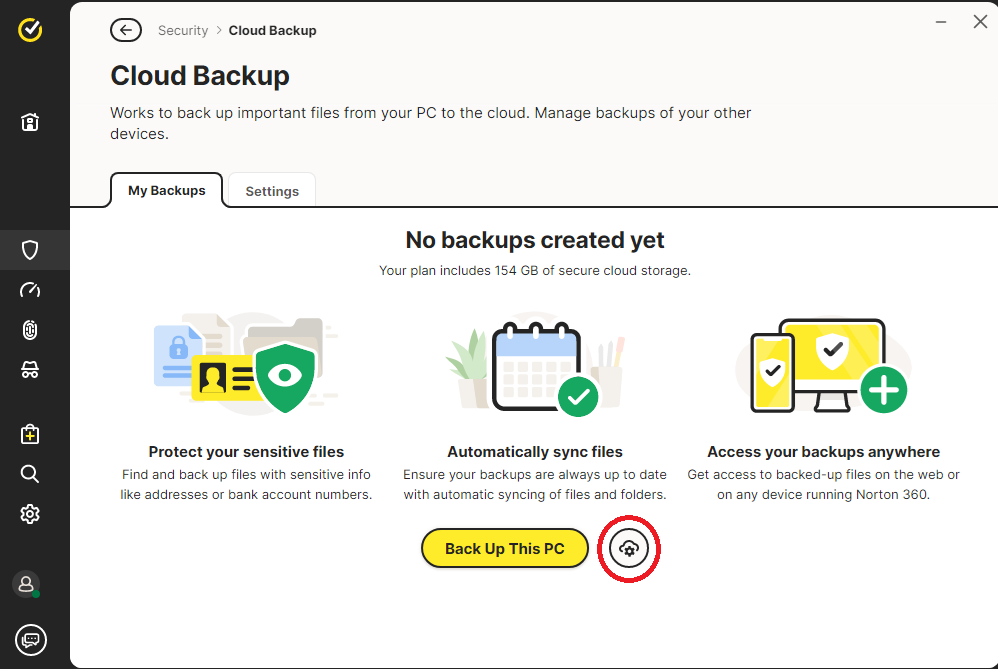
Finally, I went into Settings, Features, and did an “Open” of the “Cloud Backup”. Note that at this point my old backup was gone, so I had to completely reconfigure things. Importantly (I only found this after repeated attempts), I needed to select the icon for “settings” of my backup (a gear with a little cloud around the top of it), and not select the “Back Up This PC” button:
At this point a “Configure backup of this PC” window opened, and everything was then clear and easy to configure:
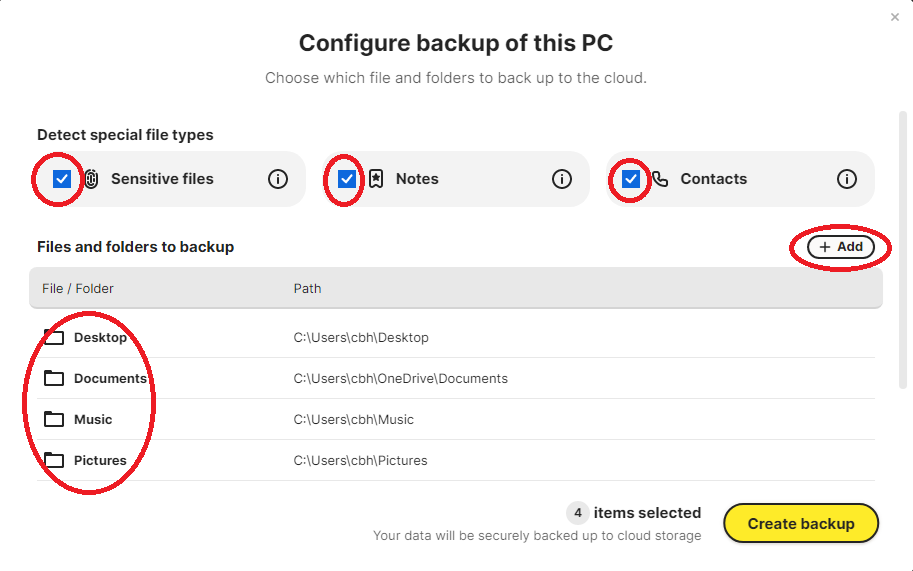
I got rid of all of the unwanted settings and the folders set by default to back up, and put in what I really wanted. I then clicked “Create Backup” and from there, things appear to be working.
Strangely, after setting up the backup, there does not seem to be any way to get back to the “Configure backup of this PC” window. Now, that is dumb! That is the single most important part of setting up a backup, for any user except the most naive!
Now, for Norton:
- This update was really not tested very well. Do better next time.
- The interface for setting up a backup is now very unclear and the documentation appears to be wrong. Frankly, clicking the little ‘gear with a cloud’ symbol was not the first thing I thought of.
- To me, the “Configure backup of this PC” is the most important thing to offer the user. Yes, a simple interface for some is appropriate, but dammit! give me the ability to get to the “Configure backup of this PC” window anytime I want!
2 Likes
Hi @mandc. Unfortunately I can’t give you any help. I am experiencing many bugs in V24 but none with “cloud backup”. I can only tell you that that whole deal you described using Norton’s Browser is ridiculous. I’d stick with the browser you’ve been using.
Let me see if I can link you to a thread I had with a ‘guru’ individual here who appears to be very knowledgeable. My question was my concern if Norton with all it’s bugs is good at doing it’s main function, blocking malware. If you have time, also read the links he provided. I think you will get into exactly what V24 is all about. I hope this link works mandc. It does work. Click the down arrow on the right to expand our full conversation.
Bonjour
Désolé je ne parle pas bien anglais, merci d’utiliser la traduction.
Je rencontre le même type de problème depuis peu avec la version 24.10.9535.882 de Norton Antivirus et je n’y comprends rien car je ne suis pas un geek !
J’ai envoyé une remarque à Norton-Symantec pour qu’ils règlent le problème au plus vite. A suivre…
What a god awful update. I can’t believe this made it to the public. Terrible interface. My live update is grayed out. My DNS is 1.1.1.2 Cloudflare. Any update for a fix for live update?
A suggestion. There is a “submit feedback” option in Norton 360 where rather than airing your issues here (where Norton won’t read/will ignore them) you can send feedback direct to Norton. I’ve used it (giving the new product a 1 star rating and some robust, but polite/constructive, feedback. If everyone did the same then maybe the flood of “1 star, its awful because …” rfeedback might make Norton take notice and realise what a mess they’ve made, and maybe even get them to fix it.
1 Like
I see the board is now over run with bot posts about loans. I’m out. Bravo Norton.
Local backup using batch files
Norton (on full scan) is resetting files to default ( archive) and hence ignoring /m in command line. This results in a massive copying exercise taking up time and resources.
How do we stop this?
I have located the source of the problem (Norton) verified by a long process of elimination.
Totally agree. Seriously thinking about dumping it.
I have 24.10.9535 (build 24.10.9535.882). It’s stopped all my backup tasks running (running from Task Scheduler) despite the folder being in the excluded list.
Security History does nothing other than a spinning “Loading your history” wheel.
As a programmer it prevents my C#/WPF apps compiling with Visual Studio 2022.
An awful “update”, I think I’ll be forced to ditch it.
As suggested, I’ve twice submitted my feelings on the update to Norton but, as half expected, received no response.
1 Like
I’ve asked that question in other posts and been told this is user community only. It appear that Norton couldn’t give a monkey’s about our problems with V24. When I did a live chat the support agent simply reinstalled V22, and tried to sell me Norton Utilities to “improve my performance”
Rubbish!
1 Like
Hi SoulAsylum , Please can you tell me what the latest news is on the BackUp to an External Hard Drive ? Are Norton going to anything about it ? Is there any chance it is being published in the media , as I have seen nothing so far.
It seems the expected desertions of Norton users if they do not do something is seriously going to affect their revenue income . Thanks, KentMan UK
Wish I could go back to the prior version:
- Just after Norton 360 updated itself to ver. 24.xx on my Win10 notebook, my UDM-Pro’s (security gateway) Unifi Network Security app started reporting and blocking – every single day – this security alert signature: “ET WORM TheMoon.linksys.router 1”
- This morning, I chose to Run Smart Scan in Win10. Got a spinning blue circle. An hour later stil there. Tried to exit app, and tried using Task Manager with no luck. Fortunately, forced reboot restored Windows on startup.
FYI for everyone!! The forums, like many other forums got hit with a massive spamming campaign. And yes, for a couple of days we were full bore getting rid of it. If that is a reason to depart Norton I suppose that is a personal choice. Believe me when I say, I’ve currently got issues that would peeve most to the point of leaving, yet!! I stand working with others to get things corrected. I implore you all to do the same.
@MrStephen_Sparkes As of this posting Norton teams are putting together another release that hopefully will fix the most important of the issues being presented here. As you are all aware, we Gurus are not an official part of Norton and are NOT privy to release dates and/or what those will entail. I can say this from a personal perspective. Back in 2017, there were issues with a release that went out then. I don’t recall the actual version, but, the point is, the issues were massive. Not missive, massive. So myself and others joined in with one of the Admins named Mohan_G. It took several weeks working as a team and all those issues got resolved. This was way before I was ever asked to be Guru, but the work of many that participated did NOT go unnoticed. Neither did Norton blindly look away from we users either.
My point is, patience is a hard thing to learn. America has become devoid of it in so many ways. We have grown accustomed to having things right then, right now. Even when we know that isn’t possible. Working toward a goal instead of trying to work against it, time goes by faster than you imagine. I just spent over two days helping clean up a mess here that wasn’t MY fault. But doing so was for the greater good of everyone here. Every user, every customer, every person. Give things a bit of time. Norton didn’t put this new software together in just a few days nor even weeks. Lets give them the benefit of the doubt and work together for solutions until Norton can give us permanent ones.
Cheers!!
SA
5 Likes